



• Latest
  • Trending
Flat for Education: The Classroom Assistant That Never Sleeps

Level Up! Intermediate Techniques for Soundtrap, Bandlab, and GarageBand Creation

March 30, 2024
UpClose-3

UpClose-3

February 14, 2026
UpClose-4

UpClose-4

February 14, 2026
UpClose-1

UpClose-1

February 13, 2026
Perspective

Perspective

February 12, 2026
Headlines

Headlines

February 12, 2026
Teachers’ Choice Winners at the NAMM Show

Teachers’ Choice Winners at the NAMM Show

February 7, 2026
Tone deaf – Decibel Scale

Tone deaf – Decibel Scale

January 29, 2026
Playing with Intent: The Missing Link Between Practice and Confidence

Playing with Intent: The Missing Link Between Practice and Confidence

January 27, 2026
French Versus German? The Over/Under on Double Bass Bow Holds

French Versus German? The Over/Under on Double Bass Bow Holds

January 26, 2026
New Products – January 2026

New Products – January 2026

January 23, 2026
Minute Clinic – STUDENT CONDUCTORS

Minute Clinic – STUDENT CONDUCTORS

January 23, 2026
Top Music Education Titles for 2025

Top Music Education Titles for 2025

January 21, 2026
Monday, February 16, 2026
  • Contact
SBO+
  • Advertise
  • Subscribe Free!
    • Manage Subscription
  • Departments
    • Choral
    • String Section
      • String Section
    • Concert Band
    • Modern Band
      • Mariachi
    • Orchestra
    • Instruments
      • Woodwinds
        • Wind Talkers
      • Percussion
        • GoodVibes
      • Repertoire
      • Playing Tips
    • Marching Band
    • Resources
      • Fundraising
    • Jazz
    • Brass
    • General Music
    • Advocacy
      • NAfME Neighborhood
      • MAC Corner
      • MusicEd: Mentor Minute
    • Commentary
      • Bubbett’s Bookshelf
      • Leadership Tips
      • Perspective
      • InService
        • America’s Bandmasters
        • America’s Musicians
      • Tone Deaf Comics
    • Features
    • News
      • Headlines
  • Current Issue
    • Past Issues
  • Support
  • Awards/Entries
    • 50 Teachers Who Make a Difference
    • Teachers’ Choice Awards
No Result
View All Result
  • Advertise
  • Subscribe Free!
    • Manage Subscription
  • Departments
    • Choral
    • String Section
      • String Section
    • Concert Band
    • Modern Band
      • Mariachi
    • Orchestra
    • Instruments
      • Woodwinds
        • Wind Talkers
      • Percussion
        • GoodVibes
      • Repertoire
      • Playing Tips
    • Marching Band
    • Resources
      • Fundraising
    • Jazz
    • Brass
    • General Music
    • Advocacy
      • NAfME Neighborhood
      • MAC Corner
      • MusicEd: Mentor Minute
    • Commentary
      • Bubbett’s Bookshelf
      • Leadership Tips
      • Perspective
      • InService
        • America’s Bandmasters
        • America’s Musicians
      • Tone Deaf Comics
    • Features
    • News
      • Headlines
  • Current Issue
    • Past Issues
  • Support
  • Awards/Entries
    • 50 Teachers Who Make a Difference
    • Teachers’ Choice Awards
No Result
View All Result
SBO+
No Result
View All Result

Level Up! Intermediate Techniques for Soundtrap, Bandlab, and GarageBand Creation

byKevin Lucas
March 30, 2024
in Archives, UpClose, Technology, March 2024
0
Flat for Education: The Classroom Assistant That Never Sleeps
Share on Facebook
ADVERTISEMENT

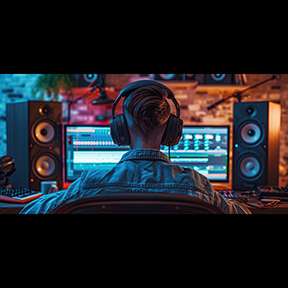
As beginner digital audio workstations (DAWs) start to mimic the look and feel of professional DAWs, and it’s both exciting and daunting to dive into all the new features. Thanks to the influence of viral social media, kids are highly motivated to produce professional mixes. Assuming your students have a basic knowledge of how to create loop-based music, it’s time to advance their skill set with three techniques to give students the edge in their composition building and songwriting.

Automation
What is automation? In music production, automation is a way of automatically making changes to an effect over time. When you select the icon to automate a track, a horizontal line appears, in which you plot points based where you want the effect to change in the timeline. A common use of automation would be changing the volume of a track to be louder in the verse and quieter in the chorus. Instead of duplicating the same track and keeping each one at fixed levels, it’s better to automate one track with all your volume changes. Though volume (loudness) is one of the most common parameters to change, other useful effects include filtering (cut or boost certain frequency ranges) or panning (placing a sound left or right in the stereo field). Taking a closer look at Soundtrap, we can see automation in action on a drum track. Here are the steps to take in order.

1. Select the automation icon inside the track channel

ADVERTISEMENT

2. Click on “+ Automation”

ADVERTISEMENT

3. Select volume

4. Plot points on the horizontal line as to where the sound should get louder (plot high point) or softer (plot low point).

Click a similar icon in BandLab to open automation features.

For GarageBand, press the “A” key or go to “mix” in the top tool bar and click “show automation”

Fades
Utilizing fades or crossfades can add a quick professional touch to improve transitions between recordings. Used constantly in video media, the concept of the audio fade is to slowly decrease the volume of one track and slowly increase the volume of another. In Soundtrap, this can easily be done by dragging the white dots in the top left and right corners of a track, as well as through the loops “edit” menu. Here is a visual for adding fades to a podcast vocal.

1. Use the dots in the top left and right corners to quickly add fades
2. Or select “edit” within the loop and select from “fade in” or “fade out” feature

In Bandlab, double click the loop region or click once and select the “editor” tab at the bottom left corner.

Hover over the white dots in the top corners of the loop, wait for the cursor to become a hand symbol, and drag.

Fades in Garageband can only be created using volume automation. To access press the “A” key or go to “mix” in the top tool bar and click “show automation”.

Staircase Effect
This is less a technical and more a compositional technique. Most loop-based projects by novice students are two-dimensional sounding. I say this with love, as most beginners are unaware of how long the timeline really is. To get them started creating structure, I introduce a concept I call the “Staircase Effect”. It’s a technique which creates interest by staggering loops. Have students begin by picking four or so loops and dragging each loop back a short distance from each other to create a staircase shape (as shown below). It’s great for teaching an “intro section” without defining it yet. It also allows students to practice deep listening skills as they comb through loops, sifting out timbres or sounds that match together. Here is a visual below of the staircase effect in use.

ADVERTISEMENT

As more features continue to become available for web-based and software DAWs, it’s important to stay up to date on their practical applications in the classroom. Feel free to check out more tips, tools, and lessons at Sound Tech Ed. Enjoy and happy music making!

SoundTechEd.com

Gillian Desmarais has been selected as the 2024 Mike Kovins Teacher of the Year by TI:ME (Technology in Music Education). She teaches music production and engineering at Harmony Learning Center, a K-12 program that serves special education students with behavioral and mental health concerns.

You may also like:

Technology: Music Ed Apps Creative Music Making with Technology in the Choral Classroom Vote Now for 2014 Best Tools for Schools The NAMM Foundation Donates $675,000 in Grants in 2017 Soundtrap: Musicmaking and Podcasting for the Classroom
Tags: education
ADVERTISEMENT
Previous Post

Flat for Education: The Classroom Assistant That Never Sleeps

Next Post

You’ll Not See Nothing Like The Mighty JamStik MIDI Guitar for the Classroom

Next Post

You’ll Not See Nothing Like The Mighty JamStik MIDI Guitar for the Classroom

Please login to join discussion
ADVERTISEMENT
  • January 2026

    Articles | Digital Issue
  • December 2025

    Articles | Digital Issue
  • November 2025

    Articles | Digital Issue
  • October 2025

    Articles | Digital Issue
  • September 2025

    Articles | Digital Issue
© 2005 - 2026 artistpro, LLC
7012 City Center Way, Suite 207
Fairview, Tennessee 37062
(800) 682-8114

No Result
View All Result
  • Advertise
  • Subscribe Free!
    • Manage Subscription
  • Departments
    • Choral
    • String Section
      • String Section
    • Concert Band
    • Modern Band
      • Mariachi
    • Orchestra
    • Instruments
      • Woodwinds
      • Percussion
      • Repertoire
      • Playing Tips
    • Marching Band
    • Resources
      • Fundraising
    • Jazz
    • Brass
    • General Music
    • Advocacy
      • NAfME Neighborhood
      • MAC Corner
      • MusicEd: Mentor Minute
    • Commentary
      • Bubbett’s Bookshelf
      • Leadership Tips
      • Perspective
      • InService
      • Tone Deaf Comics
    • Features
    • News
      • Headlines
  • Current Issue
    • Past Issues
  • Support
  • Awards/Entries
    • 50 Teachers Who Make a Difference
    • Teachers’ Choice Awards

© 2005 - 2024 artistpro, LLC 7012 City Center Way, Suite 207 Fairview, Tennessee 37062 (800) 682-8114

Wenger Transcend Ad
Wenger Transcend Ad